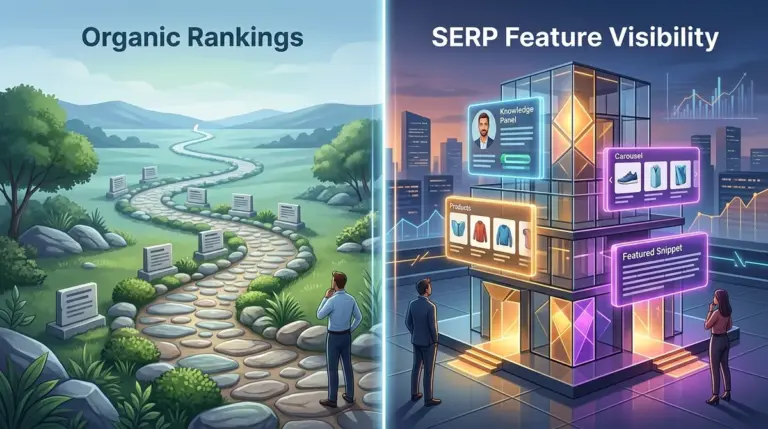
Ranking in the top three positions used to guarantee a specific click-through rate (CTR). That era ended when Google transitioned from a list of ten blue links into a multifaceted discovery engine. Today, a "Position 1" ranking for a high-volume keyword might actually sit below a Featured Snippet, a People Also Ask block, and a Sponsored carousel, effectively pushing your organic link below the fold on mobile devices. If you are only tracking numerical rank, you are missing the context of why your traffic is fluctuating despite stable positions.
The Functional Difference Between Ranking and Visibility
Traditional rank tracking measures your vertical position in the organic list. SERP feature tracking measures your actual real estate on the page. SERP features are any non-standard organic results, including visual, interactive, or data-driven elements like Knowledge Panels, Local Packs, and Sitelinks. Tracking these is no longer optional because they dictate the "pixel depth" of your result. A result at position two that is preceded by a massive Featured Snippet will often outperform a position one result that lacks any rich media enhancements.
Best for: Agencies needing to justify traffic drops to clients when rankings haven't moved, and e-commerce managers looking to protect product visibility from aggregator dominance.
High-Impact SERP Features That Move the Needle
Not all features are created equal. Some are "click-stealers" that provide the answer directly on the SERP, while others are "click-boosters" that expand your result's footprint. Understanding which is which allows you to pivot your content strategy accordingly.
- Featured Snippets (Paragraph, List, Table): These occupy "Position Zero." They are the most volatile feature and can be won or lost based on small tweaks to H2 structures or the presence of a concise 40-60 word summary.
- Local Packs (Map Pack): For any query with local intent, the Map Pack captures the vast majority of mobile clicks. If your business isn't in the top three of this block, your organic rank 100 pixels below is virtually invisible.
- People Also Ask (PAA): These blocks expand the SERP vertically. Every time a user clicks a PAA question, Google injects more questions, pushing organic results further down. Tracking PAA presence helps you identify long-tail content opportunities.
- Image and Video Carousels: For "how-to" or product-based queries, visual blocks often appear above the first organic text link. If you aren't tracking these, you won't know that your competitors are outranking you through YouTube or optimized alt-text rather than traditional SEO.
- Sitelinks: These are a sign of brand authority and significantly increase the vertical height of your listing, helping to push competitors further down the page.
Warning: The "Zero-Click" phenomenon is heavily driven by Knowledge Panels and direct answer boxes. If your target keywords are increasingly triggering these features, your organic traffic will decline even if you maintain the top spot. You must shift your strategy toward keywords that require a deeper click to resolve the user's intent.
Why Tracking Features Is Essential for Competitive Intelligence
Monitoring SERP features allows you to see exactly how Google views the intent of a keyword. If a keyword that previously showed only text links suddenly displays a "Product Grid" or "Popular Products" feature, Google has decided that the intent for that query has shifted from informational to transactional. If your page is a long-form blog post, you will likely lose rank to product category pages.
By tracking these shifts, you can identify when a competitor has successfully optimized for a "Review" snippet or a "Price" schema. This data provides a roadmap for your own technical SEO improvements. Instead of guessing why a competitor's CTR is higher, you can see the exact stars, prices, and stock statuses that are drawing the eye away from your listing.
Defending Your Real Estate
When you track SERP features, you can implement a defensive SEO strategy. For example, if you see a competitor has taken the Featured Snippet for a high-value term, you can analyze their content structure—perhaps they used a <table> tag while you used a bulleted list—and adjust your page to win it back. Without feature tracking, you would simply see a minor drop in traffic and have no data-driven explanation for it.
Integrating SERP Feature Data into Your Workflow
To make this data actionable, you should move beyond looking at a single day's snapshot. Analyze the "Feature Ownership" over time. If you notice that your "Image" features are disappearing, it is a signal to audit your CDN performance or image compression settings. If your "Local Pack" presence is shrinking, it’s time to audit your Google Business Profile and local citations.
For reporting, use "Share of Voice" metrics that account for SERP features. A position 3 result with a Video snippet and Sitelinks is often more valuable than a position 1 result that is a plain text link. Communicating this to stakeholders changes the conversation from "why aren't we #1" to "how much of the screen do we own."
SERP Feature Management FAQ
Can I choose which SERP features my site displays?
You cannot force Google to display specific features, but you can influence them through structured data (Search Engine Position Tracker). Using Product, FAQ, and Review schema increases the likelihood of rich results appearing, but Google ultimately decides based on the user's query and device.
Does winning a Featured Snippet always increase traffic?
Not necessarily. For simple factual queries (e.g., "What is the capital of France?"), a Featured Snippet may satisfy the user's curiosity on the search page, leading to a zero-click search. However, for complex topics, the snippet acts as a "teaser" that usually increases the click-through rate compared to a standard result.
How often do SERP features change?
SERP features are highly dynamic and can change based on the user's location, device type, and even the time of day. This is why automated tracking is necessary; manual checks are often inaccurate because they only show a single localized version of the SERP.
Do SERP features affect mobile and desktop differently?
Yes. Mobile SERPs are typically more cluttered with visual features like Image Packs and "Short Videos" carousels. Because screen real estate is limited on mobile, the impact of a SERP feature pushing organic results down is much more severe than on a desktop browser.